
The traditional metronome problem
Every musician has heard the universal practice rule: start slow, then gradually bring it up to tempo. Whether mastering a Chopin etude, a Bach sonata, a bebop head, a fast guitar solo, or a complex drum rudiment, gradual speed building is the undisputed core of instrumental mastery.
Yet for over two centuries, the physical metronome has made this process needlessly disruptive. Practicing with a standard static metronome forces an artificial stop-and-start routine:
- You play a passage at 80 BPM until it feels comfortable.
- You stop playing and take your hands off your instrument.
- You reach over to a dial, slider, or phone screen to bump the tempo up by 4 or 8 BPM.
- You reposition your hands, reset your posture, count in, and restart.
- You repeat this cycle ten to twenty times per practice session.
This stop-adjust-restart loop disrupts the physical flow of practice. Motor memory cooling sets in, concentration is fragmented, and a psychological hurdle is created every time the tempo jumps.
Accelerate automates the speed progression so your hands never leave your instrument. By continuously ramping tempo beat by beat, practice becomes an unbroken stream of physical adaptation and focused execution.
Benefits of an accelerating metronome
Automating tempo progressionfundamentally changes how sensorimotor system acquire musical technique:
1. Unbroken motor flow and kinesthetic memory
Continuous accelerando keeps your physical connection to your instrument alive for several uninterrupted minutes.
2. Exact diagnosis of technical breaking points
With traditional tempo jumps, if a passage succeeds at 112 BPM but collapses at 120 BPM, you have no clear picture of where the mechanics disintegrated. Was it at 114, 117, or 119 BPM?
Accelerate displays your real-time tempo as it ramps. You can observe the exact numerical BPM where articulation frays, hand synchronization drifts, or fatigue emerges. This eliminates guesswork and pinpoints the precise technical threshold that requires deliberate focus.
3. Natural self-optimization and economy of motion
At slow tempos, muscles can easily disguise inefficient motion: high finger lift, unnecessary arm weight, excessive pick depth, or erratic bow trajectory. As tempo climbs steadily without pause, excessive movement becomes physically unsustainable.
To keep pace with the accelerating pulse, the neuromuscular system might instinctively eliminate superfluous motion. Fingers naturally stay closer to keys and strings, strokes become more compact, and physical efficiency develops organically without over-thinking.
4. Safe physiological warm-up and stamina building
Repetitive strain injuries (tendonitis, carpal tunnel syndrome, focal dystonia) frequently arise when musicians jump abruptly into fast playing before tendons, synovial fluid, and muscle fibers are conditioned.
A structured accelerando session starts below your comfortable performance tempo, warming tissues and neural pathways gradually before reaching peak velocities.
Quick start
- Select Accelerate Mode: Use the mode toggle pill at the bottom of the screen to choose Accelerate.
- Set your Start BPM: Rotate the inner circular handle to your baseline tempo—a speed where the phrase feels effortless and 100% relaxed.
- Set your Target BPM: Rotate the outer circular handle to your goal tempo.
- Set your Duration: Tap the duration readout in the center dial to choose how many minutes the acceleration ramp will take (e.g. 5, 10, or 15 minutes).
- Press Play: Place both hands on your instrument and begin playing. Maintain slow-tempo relaxation as the pulse ramps beat by beat.
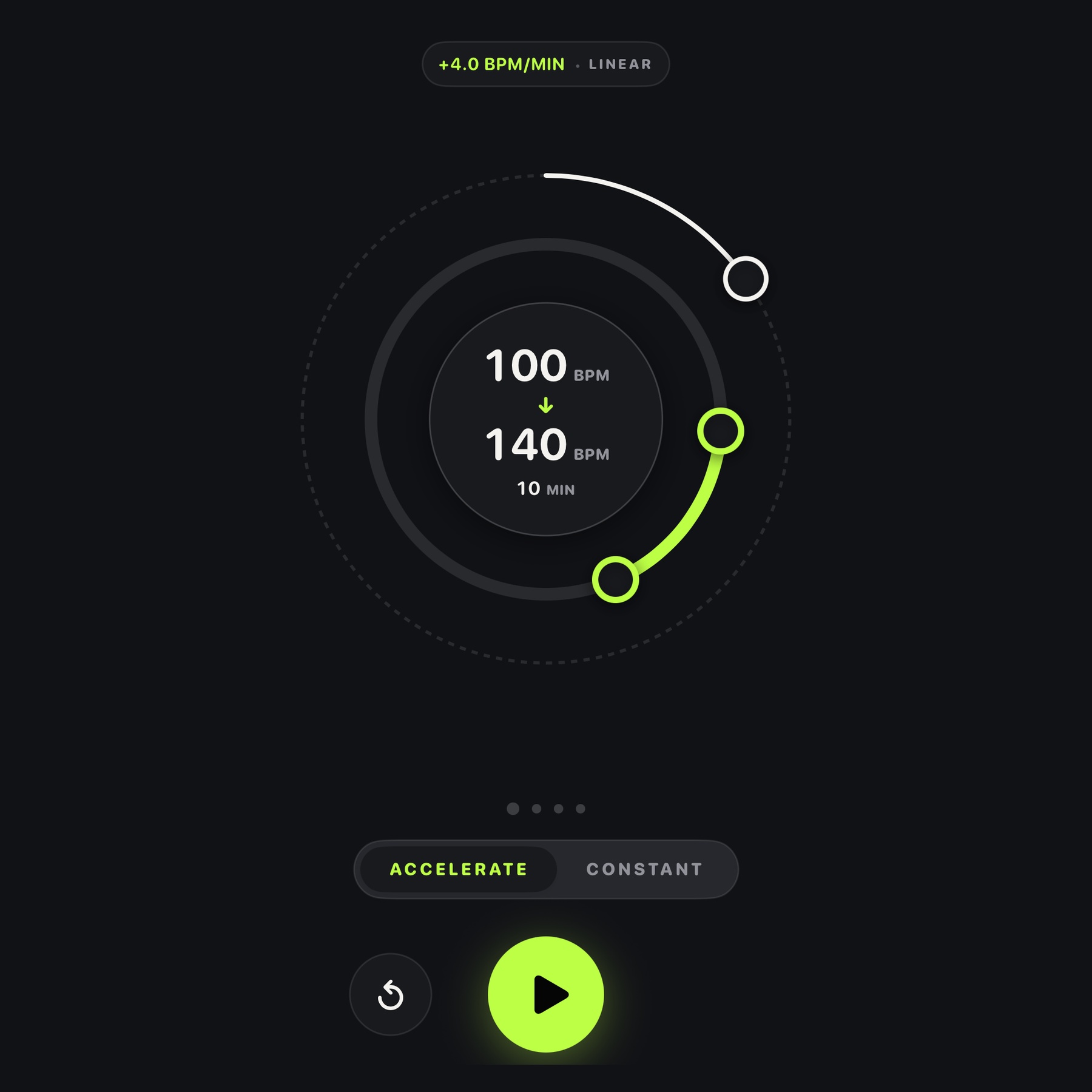
Accelerate vs Constant mode
Accelerate includes two distinct operational modes tailored to different stages of musical preparation:
Switch between modes instantly using the pill selector above the transport controls. Your settings for each mode are remembered independently.
Linear vs Stepped curves
Accelerate offers two mathematical progression models in Settings depending on your drill objectives:
| Curve | How tempo changes |
|---|---|
| Linear | Ramps tempo continuously on every single beat. The progression is mathematically smooth and imperceptible to the ear. |
| Stepped | Holds tempo stable on discrete plateaus for fixed time intervals (e.g. 1 minute per increment), then steps up by set increments. |
For technical drills, start with Linear. It creates the most effortless psychological transition into higher tempos. Switch to Stepped when you want to confirm that a passage has fully settled at a specific speed before stepping higher.
Developing internal time with Gap Click
A common trap in metronome practice is developing an acoustic dependency. If the click sounds on every single beat, the musician often plays passively—reacting to the pulse after hearing it rather than projecting the time internally.
Accelerate's Gap Click feature trains your internal rhythm clock by automatically muting bars during playback:
- 3:1 Gap Mode: Accelerate plays 3 bars of audible click, followed by 1 completely silent bar.
- During the silent bar, your internal pulse must carry the tempo and subdivisions entirely on its own.
- When bar 1 returns with an audible accented click, you receive immediate, objective feedback: did you rush, drag, or land dead on beat 1?
Practicing with Gap Click transforms the metronome from an external crutch into a rigorous test of internal rhythmic stability.
Meter, subdivisions, and accents
Tempo training requires flexibility across different rhythmic structures. Accelerate supports a wide spectrum of time signatures and subdivisions:
- Time Signatures
- Standard meters (2/4, 3/4, 4/4) and compound or odd meters (5/4, 6/8, 7/8, 9/8) with customizable primary and secondary downbeat accents.
- Subdivisions
- Quarter notes, eighth notes, triplets, and sixteenth notes. Hear the micro-divisions at slow tempos, then thin out to quarter notes as speed increases.
The Visual Beat Ring orbits the main dial in sync with playback, flashing distinct visual accents on beat 1. This provides peripheral visual timing cues so you don't have to keep your eyes fixed on the display.
Sound presets and tactile haptics
Every instrument occupies a different acoustic frequency range. Accelerate includes four studio-engineered sound profiles to ensure clean projection without ear fatigue:
- Standard: Balanced, modern studio click with crisp transients suitable for all instruments.
- Acoustic: Organic woodblock tone with rich body, ideal for piano, acoustic guitar, strings, and classical rehearsal.
- Crisp: High-frequency digital click engineered to cut through high-volume electric guitar amps and drum kits.
- Synth: Modern electronic blip with distinct downbeat pitch differentiation.
On supported iPhones and iPads, Haptic Feedback delivers sharp tactile pulses on downbeats and subdivisions, allowing you to physically feel the tempo even in loud rehearsal spaces or when practicing silently without headphones.
Studio and rehearsal workflow
Accelerate is designed to integrate cleanly into modern digital practice setups:
- Always-on display: The screen stays awake during active playback so your tempo, elapsed time, and progress ring are always visible across the room on your music stand.
- Background Audio: Accelerate continues running seamlessly when you switch to sheet music apps (forScore, Henle Library, Newzik) or audio accompaniment software (GarageBand, iReal Pro, Moises, Spotify).
- External Audio & AirPlay: Full support for Bluetooth monitors, studio audio interfaces, and headphone outputs with zero timing drift.
Possible practice routines
Here are three structured practice routines utilizing Accelerate's features for maximum technical gains:
Routine A: The 10-Minute Daily Speed Ramp
Use this routine for daily fundamental exercises (scales, arpeggios, rudiments, picking drills).
- Set Start BPM to 60% of your target speed (e.g. 72 BPM if your goal is 120 BPM).
- Set Target BPM to your target speed (120 BPM).
- Set Duration to 20 minutes with Linear curve.
- Play the exercise continuously. Focus on tone consistency and minimal finger tension as tempo climbs.
Routine B: The Speed Wall Breakthrough
Use this routine when a difficult passage has hit a stubborn technical plateau.
- Identify your plateau tempo (e.g. 104 BPM where the passage breaks down).
- Set Start BPM 10 BPM below the barrier (94 BPM).
- Set Target BPM 4 BPM above your barrier (108 BPM).
- Set Duration to 4 minutes with Linear curve.
- Because the ramp is tight and gradual, your hands pass through the barrier at 104 BPM without conscious anxiety. Finish the drill by holding the passage at 108 BPM in Constant Mode for 1 minute.
Routine C: The Timekeeper (Internal Clock Test)
Use this routine to eliminate rushing and anchor your internal sense of time.
- Set mode to Accelerate or Constant at a comfortable mid-tempo.
- In Settings, toggle Gap Click (3:1) ON.
- Play through a 16-bar or 32-bar form. Pay close attention to bar 4, 8, 12, and 16 when the click goes silent.
- Aim to hit beat 1 of every subsequent audible bar with laser precision.
Accelerate Pro
Accelerate is free to download and evaluate. Free sessions include full access to the rotary controls, sound presets, and acceleration curves for up to 2 minutes of playback per session.
Upgrading to Accelerate Pro unlocks unlimited session durations:
- Unlimited practice duration
- Pay once, own forever - a single one-time lifetime purchase with No recurring subscriptions, no account logins, and no advertisements.
- Universal license - unlocks Accelerate across your iPhone, iPad under the same Apple ID.
To restore a previous purchase on a new device, tap the Settings icon and select Restore Purchases.
Troubleshooting and support
| Issue | What to check |
|---|---|
| Audio stops when locking screen or switching apps | Ensure Background App Refresh is permitted in iOS Settings > Accelerate, and confirm your device is not in Low Power Mode. |
| No sound during playback | Check that your device's Silent/Mute switch is not engaged and verify that volume is turned up in both iOS Control Center and Accelerate Settings. |
| Haptics are not felt on iPad | Apple iPads do not contain haptic vibration hardware. Haptic pulses are supported on compatible iPhone models. |
| Gap Click sounds are silent | In Gap Click (3:1) mode, every 4th bar is intentionally muted to test internal timing. Toggle Gap Click OFF in Settings for continuous audio. |
| Pro purchase not recognized | Open Settings in Accelerate, tap Restore Purchases, and ensure the device is signed into the original Apple ID used for purchase. |
Need assistance or have feedback on tempo training features? Contact Coggie Studio support: